Anyone can draw prompt → model → output. What breaks in production is rate
limits, partial failures, silent fallbacks and steps that must never be retried.
Those are invisible in code and obvious in a graph — which is the whole reason
to design one visually.
Five relationships, drawn differently
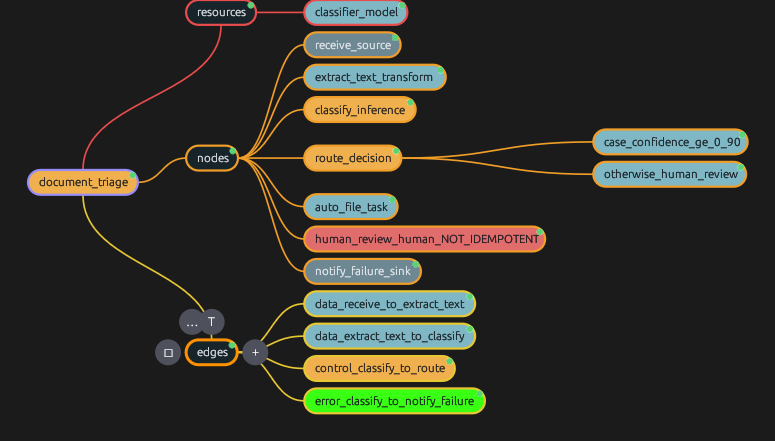
Control, data, dependency, error and compensation are distinct edge types with
distinct scheduling meaning — and distinct rendering on the canvas.
If you cannot tell an error path from a data path at a glance, the
picture is not showing you the workflow.
Idempotence on the node, not in a panel
A step marked non-idempotent is flagged on the canvas itself, and the studio
refuses to attach a retry policy to it.
Getting this wrong charges the card twice. It deserves to be visible
without clicking.
Inline validation while you draw
Every rule in the specification carries an HX-nnnn code. They surface
on the canvas, at the node, as you work — not in a modal after export.
A dangling edge or an unbounded loop should never survive to a build.
Bounded loops, enforced
A loop will not draw without maxIterations. There is no unbounded
form to reach for.
An unbounded loop in an unattended workflow is a defect, not a
feature — and with LLM calls it is also a bill.
Simulate before you spend
Script the outcomes — “the model rate-limits twice, then returns 0.62
confidence” — and watch the escalation path execute with zero API calls.
Prove the low-confidence path works before a customer discovers it
does not.
Replay a real run onto the canvas
Execution traces are part of the specification, so a run from any
conforming runtime replays here: nodes light up SUCCEEDED, RETRYING with its
backoff, FAILED, COMPENSATED — and the branch not taken stays dim.
Only a visual tool can do this, and it is the fastest way to
understand what actually happened.
Cost and fan-out, computed
Loop bounds and concurrency are declared in the document, so the worst-case
number of model calls is computable before a single one is made.
“This design can make 480 calls” is worth knowing in the
designer, not on the invoice.
Variants and finetuning
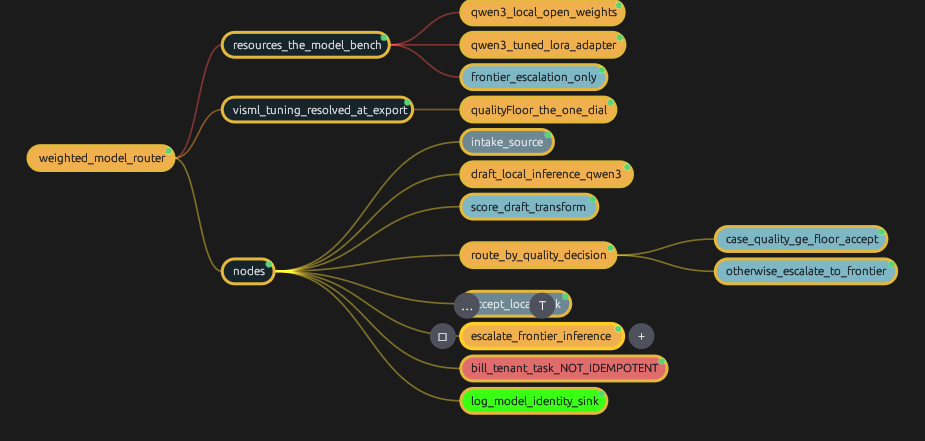
Tune thresholds, weights and attributes as named variants in the map, and export
each as its own concrete, validated .hxml.
Every variant is a real document with its own identity, so you can
always say which one ran.